• Home
  • About
  • Blog
  • Shop
    • My account
    • Cart
    • Checkout
  • Contact & FAQs
  • Custom Art
  • Tangled Side Quest
    • Email
    • Facebook
    • Instagram
    • Pinterest

Green Grubs Garden Club

Lovingly handcrafting unique, creative & beautiful kiwi resources!

Contact & FAQs

What's up?

Facebook Pinterest-p Instagram Envelope

DIGITAL PURCHASES & DOWNLOADS

Are Green Grubs resources physical products or digital downloads?

Most Green Grubs teaching resources are digital files that you download and print yourself. No physical copy will be posted unless the product listing clearly states that it is a physical item.

My Tangled Side Quest creations are physical, one-of-a-kind fibre artworks. These listings include shipping or collection information in their individual product descriptions.

How do I find and download the resource I’ve purchased?

Once your payment has been successfully processed, you’ll be taken to an Order received page. You can download your purchase immediately by clicking the button under Download.

You’ll also receive an order confirmation email containing a direct link to your resource. This normally arrives within a few minutes, but it can occasionally end up in your junk or spam folder.

If you have a Green Grubs account, you can also sign in and look under My Account → Downloads.

Where is my purchase? My download email hasn’t arrived.

Your download email is sent automatically to the email address entered at checkout, usually within a few minutes of your payment being processed.

If you can’t find it, please check the following:

  • Have a peek in your junk or spam folder.
  • Check whether you used your school email address or your personal email address at checkout.
  • Search your inbox for “Green Grubs”.
  • Check that the email address entered with your order was spelled correctly.
  • If you created an account, sign in and look under My Account → Downloads.

Still can’t find it? Please get in touch with your name and order details, and I’ll help get you sorted as soon as possible.

What is a ZIP file, and how do I open it?

A ZIP file is a compressed folder containing several files bundled together. At Green Grubs, ZIP folders are most commonly used for clip-art sets containing multiple individual image files.

You’ll need to extract or “unzip” the folder before using the files inside it.

Opening a ZIP file on Windows:

  1. Download the ZIP file.
  2. Right-click the unopened ZIP folder.
  3. Select Extract All.
  4. Choose where you’d like the extracted files to be saved.
  5. Click Extract.

Opening a ZIP file on a Mac:

  1. Download the ZIP file.
  2. Double-click the unopened ZIP folder.
  3. Your Mac should extract it automatically and create a regular folder in the same location.

Alternatively, hold down the Control key while clicking the ZIP folder, then select Open With → Archive Utility.

Opening a ZIP file on an iPhone or iPad:

  1. Download the ZIP file and open the Files app.
  2. Find the ZIP file in your Downloads folder.
  3. Tap the ZIP file once to create an unzipped folder.
  4. Tap the new folder to see the files inside.

Opening a ZIP file on an Android device:

  1. Open your device’s Files or Files by Google app.
  2. Find the downloaded ZIP file.
  3. Tap the file and select Extract.
  4. Open the new folder to see the individual files.

For larger clip-art collections, downloading and organising the files on a computer is usually much easier than using a phone or tablet.

Can I edit the resource I’ve purchased?

Please check the individual product description before purchasing. Most printable PDF resources are supplied as finished files and are not editable unless the listing specifically says otherwise.

Clip-art sets usually contain individual PNG image files, which can be added to compatible programs such as PowerPoint, Canva and Google Slides.

Can I incorporate Green Grubs images into AI?

All Green Grubs artwork remains protected by copyright. Purchasing a resource gives you permission to use it according to the licence supplied; it does not transfer ownership of the artwork. Images may not be copied, lifted, traced, redrawn, altered or redistributed as standalone graphics.

Please do not upload Green Grubs artwork to generative AI platforms or ask an AI tool to reproduce, imitate, alter or incorporate the images into newly generated artwork. This includes using the artwork as a reference image, prompt attachment or training material.

If you’re unsure whether a particular resource will work for your needs—or whether your intended use is permitted—please feel free to ask before purchasing.

PAYMENT & CHECKOUT

What payment methods are available?

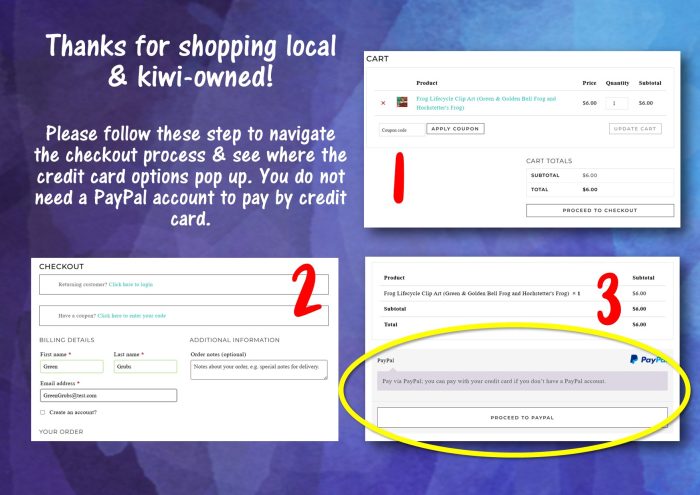
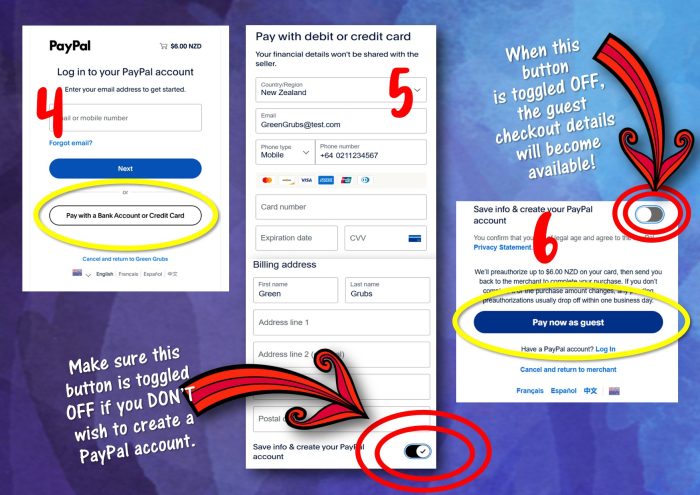
You can pay using a credit card, debit card or through PayPal.

If you choose PayPal at checkout, you can also pay using your credit or debit card without having a PayPal account. Simply select the PayPal option and choose the option to pay by card as a guest.

*Making a school purchase and would prefer to invoice the school? No worries! Reach out and let me know what resources you’d like and your schools details and I can arrange that for you.

Can my school be invoiced instead?

Absolutely. If you’re making a school purchase and would prefer the invoice to be sent to your school office, please get in touch.

This can be particularly handy if you’d like to use a classroom or departmental budget rather than paying with your own funds. Let me know which resources you need, along with the school and invoicing details, and I can arrange this for you.

I’m having trouble completing the checkout. What should I do?

First, check that all required checkout fields have been completed and that your email address is correct.

If the checkout page still isn’t cooperating, try refreshing the page or using a different browser or device. You’re also very welcome to contact me—I’m happy to help you complete your purchase or arrange a school invoice.

USING & SHARING GREEN GRUBS RESOURCES

Can I share the resource I’ve purchased with other people?

A standard purchase is licensed for use by one person, so the digital files can’t be shared with colleagues, friends or an entire teaching team.

As a small, locally owned creative business, I really appreciate you respecting these terms and directing other teachers to the Green Grubs website to purchase their own copy.

If several people at your school would like to use the same resource, discounted multiple-user licences may be available. Please get in touch with the number of users required, and I can arrange an invoice for your team.

Can I use a resource across several classes or devices?

You’re welcome to use your purchased resource with the children you personally teach and to access it on your own devices.

If the files will be used independently by multiple teachers, classrooms or staff members, each user will need their own licence. Please contact me if you’d like help arranging a discounted multiple-user licence.

Can I upload a purchased resource to Google Classroom, Seesaw or another online learning platform?

You may share the resource with the students you currently teach through a secure, password-protected learning platform.

Please don’t upload the files to public websites, shared drives, social-media groups or other locations where people outside your own class can access or download them.

Can I use Green Grubs clip art in something I plan to sell?

Yes. A purchased clip-art set may be used for personal projects and limited small commercial use of up to 20 physical items, without purchasing an Extended Commercial Licence.

Examples include stickers, planners, bags, mugs, banners, invitations, greeting cards and other physical products.

Please ensure that:

  • The clip art forms part of your own completed design rather than being resold or redistributed as individual image files.
  • The original clip-art files cannot be extracted or accessed by your customers.
  • You don’t claim the Green Grubs artwork as your own.
  • You don’t share, resell or redistribute the original clip-art files.

Educational digital resources created for sale through platforms such as Teachers Pay Teachers are not subject to the 20-item physical-product limit. However, the artwork must still be incorporated into your own finished educational design and secured so that the individual images cannot be easily extracted.

When do I need an Extended Commercial Licence?

You’ll need an Extended Commercial Licence if you plan to produce or distribute between 20 and 200 physical items featuring artwork from a purchased clip-art set.

Please note:

  • Each Extended Commercial Licence covers one clip-art set only.
  • A new licence is required for each additional run of up to 200 physical items.
  • The licence does not allow you to resell, share or redistribute the original clip-art files.

Please reach out if you’re unsure which licence you need—I’m always happy to clarify before you begin production.

Find out more about the Extended Commercial Licence.

PRINTING & FILE HELP

What should I do if my printable doesn’t print at the expected size?

First, check the printing instructions included with the resource or in its product description.

In your printer settings, look for options such as Actual size or 100% if the resource needs to retain its original measurements. Options such as Fit to page can enlarge or shrink the design slightly.

Printer menus vary, so please contact me with the name of the resource, the size you’re trying to achieve and a screenshot of your print settings if you need help.

The file looks blurry or pixelated when printed. What should I do?

Make sure you’ve downloaded and opened the original file rather than printing a small website preview or screenshot.

Print quality can also be affected by enlarging a design beyond its intended size, low-quality printer settings or an image being copied and pasted from a browser.

If you’re having trouble, please send me the product name, the file you’re using and the intended print size so I can help investigate.

Why are black boxes, white backgrounds or strange blocks appearing when I print?

Occasionally, a printer or PDF reader has difficulty processing transparent graphics. This can cause the dreaded “black box” issue—or make coloured backgrounds disappear from behind text and images—even though the PDF looks completely normal on screen. 

Fortunately, it’s usually a printing or software issue rather than a problem with the resource itself. Try the following:

  1. Download and save the PDF to your computer first. Avoid printing directly from a website preview, browser window, email attachment or cloud-storage preview.
  2. Open the saved file in Adobe Acrobat Reader. Printing from a dedicated PDF reader is generally more reliable than printing from your internet browser.
  3. Check for updates. Make sure your PDF-reading software and printer drivers are fully up to date.
  4. Try “Print as Image”. In Adobe Acrobat Reader, select Print → Advanced → Print as Image, then try printing again. This allows the printer to treat each page as a complete image and often resolves problems with transparency, missing backgrounds and unwanted boxes.
  5. Try a different computer or printer. If possible, test the file on another device. This can help determine whether the issue is being caused by a particular printer, driver or PDF program.

If you purchased the resource through Teachers Pay Teachers and the issue continues, you can also check TpT’s printing and troubleshooting guidance.

Still stuck? Please get in touch and include the name of the resource, the device and program you’re printing from, and—if possible—a photo of the printed page. I’ll do my best to help you solve the mystery!

PHYSICAL ITEMS & TANGLED SIDE QUEST

Are Tangled Side Quest creations ready-made or made to order?

Unless the individual listing says otherwise, Tangled Side Quest creations are finished, one-of-a-kind pieces. The item pictured is the item you’ll receive.

Because each creation is handmade, small quirks and variations are all part of its character.

How quickly will my physical order be sent?

Ready-made physical items are carefully packed and dispatched within 2-4 working days of receiving your order.

Orders placed over a weekend or public holiday will begin processing on the next working day. You’ll receive an email when your parcel has been sent.

Will I receive tracking information?

Yes. When your parcel is booked with the courier, you’ll receive a dispatch email containing the tracking information.

Please allow a little time for the courier’s tracking system to update after the parcel has been collected.

Can I collect my Tangled Side Quest purchase in Whangārei?

A free Whangārei collection or mutually arranged drop-off option may be available at checkout.

For privacy and practical reasons, collection details will be arranged with you after your order is confirmed rather than displaying a home address online.

How should I care for my Tangled Side Quest creation?

Each piece is handmade and may contain a mixture of yarn, stuffing, embellishments and found or natural materials.

Please follow the care information included in the individual product listing. In general, these pieces are best kept dry, handled with care and spot-cleaned gently rather than placed in a washing machine.

Some creations are decorative artworks rather than toys. Any item designed for gentle play will be clearly identified in its listing.

STILL NEED HELP?

Please get in touch through the Green Grubs contact form at the top of this page and let me know how I can help.

If your question relates to an existing order, please include your name, order number and the email address used at checkout so I can find it quickly.

Let’s Connect

  • Email
  • Facebook
  • Instagram
  • Pinterest

Your Cart

Blog Categories

Search

SUBSCRIBE! YAY!

Join my mailing list for all the latest updates!

SUBSCRIBE! YAY!

Join my mailing list for all the latest updates!

  • Terms & Conditions
  • Privacy Policy

Copyright © 2026 — Green Grubs Garden Club • All rights reserved. • Privacy Policy

Genesis Framework • WordPress • Log in